Supabase למפתחי Full-Stack: מדריך מעשי
כל מה שצריך לדעת על שימוש ב-Supabase כבקאנד - מאימות משתמשים ושאילתות מסד נתונים ועד מנויי זמן אמת ואחסון קבצים, עם דוגמאות TypeScript.

# Supabase for Full-Stack Developers: A Practical Guide
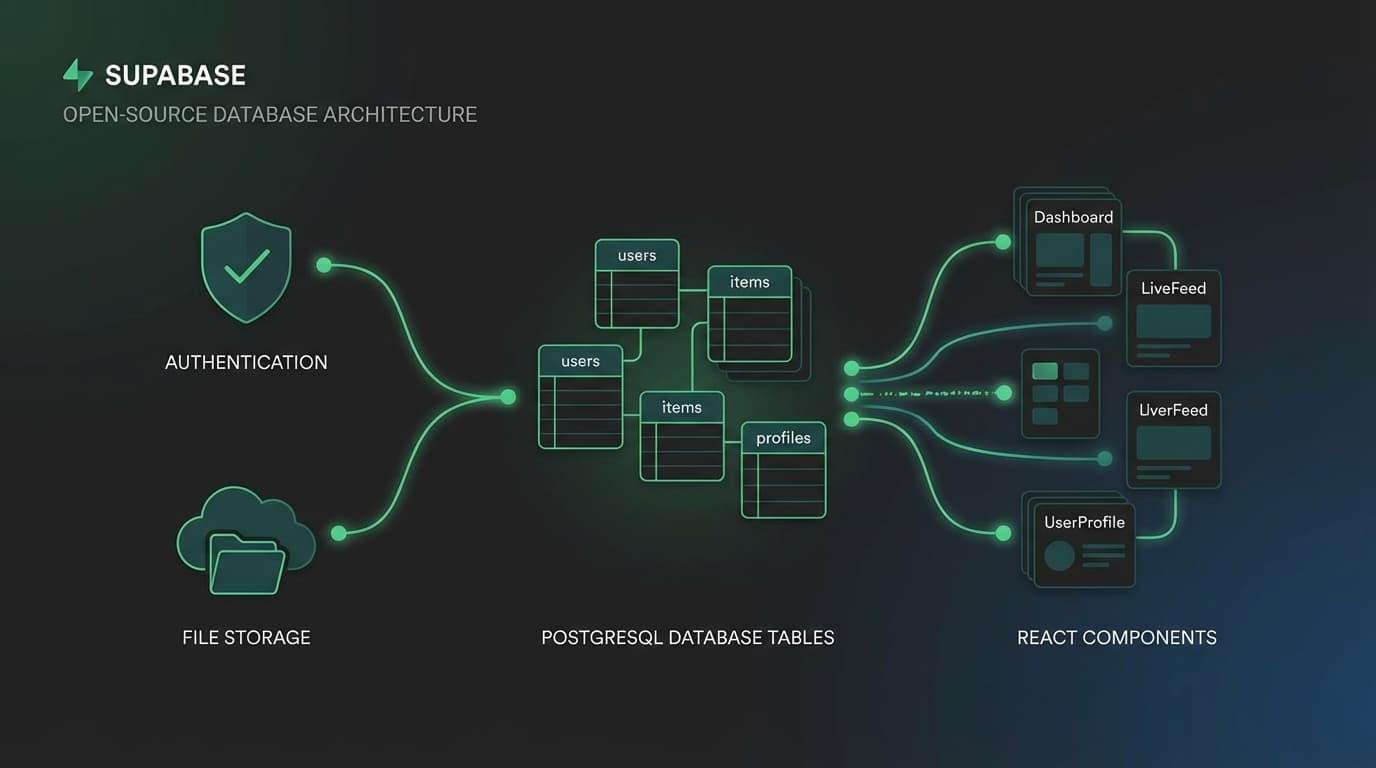
When I first discovered Supabase, it changed how I approach building web applications. Instead of spending weeks setting up authentication, designing database schemas in raw SQL, configuring WebSocket servers, and integrating file storage, I had a production-ready backend in an afternoon. Supabase is an open-source Firebase alternative built on top of PostgreSQL, and it gives you everything a full-stack developer needs without locking you into proprietary technology.
In this guide, I will walk through the four pillars of Supabase that I use in every project: Authentication, Database, Realtime, and Storage.
## Setting Up Supabase with TypeScript
The first step is always type safety. Supabase has excellent TypeScript support, and generating types from your database schema ensures your frontend and backend stay in sync.
```typescript
// lib/supabase.ts
import { createClient } from "@supabase/supabase-js";
import type { Database } from "@/types/supabase";
const supabaseUrl = process.env.NEXT_PUBLIC_SUPABASE_URL!;
const supabaseAnonKey = process.env.NEXT_PUBLIC_SUPABASE_ANON_KEY!;
export const supabase = createClient
// Server-side client with service role for admin operations
export function createServerClient() {
return createClient
supabaseUrl,
process.env.SUPABASE_SERVICE_ROLE_KEY!,
{
auth: {
autoRefreshToken: false,
persistSession: false,
},
}
);
}
```
Generate your TypeScript types with one command:
```bash
bunx supabase gen types typescript --project-id your-project-id > types/supabase.ts
```
This generates complete type definitions for every table, view, and function in your database. When you query supabase.from("projects").select("*"), TypeScript knows exactly what columns exist and their types. No guessing, no runtime surprises.
## Authentication: Simple Yet Powerful
Supabase Auth handles the complexity of user authentication so you do not have to. It supports email/password, magic links, OAuth providers (Google, GitHub, Discord, and many more), and even phone authentication. The best part is that it integrates directly with PostgreSQL's Row Level Security, so your auth layer and data access layer are unified.
Here is a complete authentication hook I use across my projects:
```tsx
"use client";
import { useEffect, useState } from "react";
import { supabase } from "@/lib/supabase";
import type { User, Session } from "@supabase/supabase-js";
interface AuthState {
user: User | null;
session: Session | null;
isLoading: boolean;
}
export function useAuth() {
const [authState, setAuthState] = useState
user: null,
session: null,
isLoading: true,
});
useEffect(() => {
supabase.auth.getSession().then(({ data: { session } }) => {
setAuthState({
user: session?.user ?? null,
session,
isLoading: false,
});
});
const { data: { subscription } } = supabase.auth.onAuthStateChange(
(_event, session) => {
setAuthState({
user: session?.user ?? null,
session,
isLoading: false,
});
}
);
return () => subscription.unsubscribe();
}, []);
const signInWithGoogle = async () => {
const { error } = await supabase.auth.signInWithOAuth({
provider: "google",
options: { redirectTo: ${window.location.origin}/auth/callback },
});
return { error };
};
const signInWithEmail = async (email: string, password: string) => {
const { data, error } = await supabase.auth.signInWithPassword({
email,
password,
});
return { data, error };
};
const signOut = async () => {
const { error } = await supabase.auth.signOut();
return { error };
};
return { ...authState, signInWithGoogle, signInWithEmail, signOut };
}
```
This hook gives you reactive auth state throughout your application. When a user signs in or out, every component that calls useAuth() updates automatically. The onAuthStateChange listener handles token refresh, session expiry, and cross-tab synchronization out of the box.
## Database: PostgreSQL with Superpowers
Under the hood, Supabase is PostgreSQL. This means you get the full power of a mature relational database: joins, indexes, full-text search, JSON columns, and stored functions. The JavaScript client provides a query builder that feels natural while remaining type-safe.
Here is how I typically structure data access in a project:
```typescript
// lib/queries/projects.ts
import { supabase } from "@/lib/supabase";
import type { Database } from "@/types/supabase";
type Project = Database["public"]["Tables"]["projects"]["Row"];
type ProjectInsert = Database["public"]["Tables"]["projects"]["Insert"];
export async function getProjects(options?: {
category?: string;
limit?: number;
offset?: number;
}) {
let query = supabase
.from("projects")
.select("*, project_tags(tag_name)", { count: "exact" })
.order("created_at", { ascending: false });
if (options?.category) {
query = query.eq("category", options.category);
}
if (options?.limit) {
query = query.limit(options.limit);
}
if (options?.offset) {
query = query.range(options.offset, options.offset + (options?.limit ?? 10) - 1);
}
const { data, error, count } = await query;
if (error) {
return { data: null, error: error.message, count: 0 };
}
return { data, error: null, count: count ?? 0 };
}
export async function createProject(project: ProjectInsert) {
const { data, error } = await supabase
.from("projects")
.insert(project)
.select()
.single();
if (error) {
return { data: null, error: error.message };
}
return { data, error: null };
}
export async function searchProjects(searchTerm: string) {
const { data, error } = await supabase
.from("projects")
.select("*")
.textSearch("title", searchTerm, { type: "websearch" })
.limit(20);
return { data: data ?? [], error: error?.message ?? null };
}
```
A few things to notice. The select method supports relation queries with that simple string syntax -- "*, project_tags(tag_name)" automatically joins the related table. The textSearch method leverages PostgreSQL's built-in full-text search, no external search service needed. And every function returns a consistent shape with typed data and error fields.
### Row Level Security: Authorization at the Database Layer
One of Supabase's most powerful features is Row Level Security (RLS). Instead of checking permissions in your application code, you define policies directly in PostgreSQL. The database itself enforces who can read, insert, update, or delete each row.
```sql
-- Enable RLS on the projects table
ALTER TABLE projects ENABLE ROW LEVEL SECURITY;
-- Anyone can read published projects
CREATE POLICY "Public can view published projects"
ON projects FOR SELECT
USING (published = true);
-- Only the owner can update their projects
CREATE POLICY "Owners can update their projects"
ON projects FOR UPDATE
USING (auth.uid() = user_id)
WITH CHECK (auth.uid() = user_id);
-- Only authenticated users can create projects
CREATE POLICY "Authenticated users can create projects"
ON projects FOR INSERT
WITH CHECK (auth.uid() = user_id);
```
With RLS, even if your frontend code has a bug that sends the wrong query, the database will refuse to return or modify data the user should not have access to. This is defense in depth, and it is one of the reasons I trust Supabase for production applications.
## Realtime: Live Data Without the Complexity
Building realtime features traditionally requires setting up WebSocket servers, managing connection state, handling reconnections, and synchronizing data. Supabase Realtime eliminates all of that. You subscribe to database changes and get updates pushed to your client automatically.
```tsx
"use client";
import { useEffect, useState } from "react";
import { supabase } from "@/lib/supabase";
interface ChatMessage {
id: string;
content: string;
user_id: string;
user_name: string;
created_at: string;
}
export function useChatMessages(roomId: string) {
const [messages, setMessages] = useState
useEffect(() => {
// Load initial messages
supabase
.from("chat_messages")
.select("*")
.eq("room_id", roomId)
.order("created_at", { ascending: true })
.limit(100)
.then(({ data }) => {
if (data) setMessages(data);
});
// Subscribe to new messages in realtime
const channel = supabase
.channel(room-${roomId})
.on(
"postgres_changes",
{
event: "INSERT",
schema: "public",
table: "chat_messages",
filter: room_id=eq.${roomId},
},
(payload) => {
const newMessage = payload.new as ChatMessage;
setMessages((prev) => [...prev, newMessage]);
}
)
.subscribe();
return () => {
supabase.removeChannel(channel);
};
}, [roomId]);
const sendMessage = async (content: string, userId: string, userName: string) => {
const { error } = await supabase.from("chat_messages").insert({
room_id: roomId,
content,
user_id: userId,
user_name: userName,
});
return { error: error?.message ?? null };
};
return { messages, sendMessage };
}
```
The postgres_changes channel listens for actual database INSERT events, filtered by room. When any client inserts a new message, every other client subscribed to that room receives it instantly. The cleanup function in the useEffect return ensures we do not leak subscriptions.
## Storage: File Uploads Made Simple
Supabase Storage is built on top of S3-compatible object storage with its own set of RLS policies. Uploading files, generating public URLs, and managing access is straightforward.
```typescript
// lib/storage.ts
import { supabase } from "@/lib/supabase";
export async function uploadAvatar(userId: string, file: File) {
const fileExtension = file.name.split(".").pop();
const filePath = ${userId}/avatar.${fileExtension};
const { data, error } = await supabase.storage
.from("avatars")
.upload(filePath, file, {
cacheControl: "3600",
upsert: true,
});
if (error) {
return { url: null, error: error.message };
}
const { data: urlData } = supabase.storage
.from("avatars")
.getPublicUrl(data.path);
return { url: urlData.publicUrl, error: null };
}
export async function deleteAvatar(userId: string) {
const { error } = await supabase.storage
.from("avatars")
.remove([${userId}/avatar.png, ${userId}/avatar.jpg, ${userId}/avatar.webp]);
return { error: error?.message ?? null };
}
```
The upsert: true option means re-uploading replaces the existing file without errors. Combined with storage policies, you can ensure users can only upload to their own directory and only read files they have permission to access.
## Putting It All Together
What makes Supabase compelling is not any single feature in isolation. It is how all four pillars work together. Auth integrates with RLS policies. Database changes trigger Realtime subscriptions. Storage respects the same auth context. Everything shares the same project, the same dashboard, and the same type system.
For a full-stack developer, this means you can go from idea to production with a single backend service that handles authentication, data persistence, live updates, and file management. No stitching together five different SaaS products. No managing multiple API keys and SDKs. One client, one type system, one mental model.
## My Recommendations
After building multiple production applications with Supabase, here are the patterns I always follow:
1. Generate types after every schema change - Run the type generation command as part of your workflow, not as an afterthought
2. Always enable RLS - Even for tables you think are "public only," enable RLS and write explicit policies
3. Use the server client for admin operations - Never expose the service role key to the browser
4. Filter Realtime subscriptions - Always use the filter parameter to avoid receiving events you do not need
5. Structure storage by user ID - Makes cleanup and access control straightforward
Supabase is not just a Firebase alternative. For TypeScript developers, it is arguably the most productive backend platform available today.
Want to discuss Supabase architecture or need help with your project's backend? Let's connect.
## Supabase למפתחי Full-Stack: מדריך מעשי
כשגיליתי לראשונה את Supabase, זה שינה את האופן שבו אני ניגש לבניית יישומי ווב. במקום לבזבז שבועות בהגדרת אימות, עיצוב סכימות מסד נתונים ב-SQL גולמי, הגדרת שרתי WebSocket ואינטגרציית אחסון קבצים, קיבלתי בקאנד מוכן לפרודקשן בצהריים. Supabase היא חלופה לFirebase בקוד פתוח הבנויה על PostgreSQL, ומספקת לכם את כל מה שמפתח Full-Stack צריך מבלי לנעול אתכם בטכנולוגיה קניינית.
במדריך זה אעבור על ארבעת עמודי התווך של Supabase שאני משתמש בכל פרויקט: אימות, מסד נתונים, Realtime ואחסון.
### הגדרת Supabase עם TypeScript
הצעד הראשון הוא תמיד בטיחות טיפוסית. ל-Supabase יש תמיכה מצוינת ב-TypeScript, ויצירת טיפוסים מסכימת מסד הנתונים שלכם מבטיחה שהפרונטאנד והבקאנד שלכם יישארו מסונכרנים.
```typescript
// lib/supabase.ts
import { createClient } from "@supabase/supabase-js";
import type { Database } from "@/types/supabase";
const supabaseUrl = process.env.NEXT_PUBLIC_SUPABASE_URL!;
const supabaseAnonKey = process.env.NEXT_PUBLIC_SUPABASE_ANON_KEY!;
export const supabase = createClient
// לקוח צד שרת עם service role לפעולות אדמין
export function createServerClient() {
return createClient
supabaseUrl,
process.env.SUPABASE_SERVICE_ROLE_KEY!,
{
auth: {
autoRefreshToken: false,
persistSession: false,
},
}
);
}
```
צרו את טיפוסי TypeScript שלכם עם פקודה אחת:
```bash
bunx supabase gen types typescript --project-id your-project-id > types/supabase.ts
```
זה יוצר הגדרות טיפוס מלאות לכל טבלה, view ופונקציה במסד הנתונים שלכם. כשאתם שולחים שאילתה supabase.from("projects").select("*"), TypeScript יודע בדיוק אילו עמודות קיימות וסוגיהן. ללא ניחושים, ללא הפתעות בזמן ריצה.
### אימות: פשוט אך עוצמתי
Supabase Auth מטפל במורכבות אימות המשתמשים כך שאתם לא צריכים. הוא תומך באימות דרך דוא"ל/סיסמה, קישורים קסומים, ספקי OAuth (Google, GitHub, Discord ועוד רבים), ואפילו אימות טלפון. החלק הטוב ביותר הוא שהוא משתלב ישירות עם Row Level Security של PostgreSQL, כך שהשכבה האמינות ושכבת גישה לנתונים שלכם מאוחדות.
הנה hook אימות מלא שאני משתמש בו בפרויקטים שלי:
```tsx
"use client";
import { useEffect, useState } from "react";
import { supabase } from "@/lib/supabase";
export function useAuth() {
const [authState, setAuthState] = useState({
user: null,
session: null,
isLoading: true,
});
useEffect(() => {
supabase.auth.getSession().then(({ data: { session } }) => {
setAuthState({ user: session?.user ?? null, session, isLoading: false });
});
const { data: { subscription } } = supabase.auth.onAuthStateChange(
(_event, session) => {
setAuthState({ user: session?.user ?? null, session, isLoading: false });
}
);
return () => subscription.unsubscribe();
}, []);
const signInWithGoogle = async () => {
const { error } = await supabase.auth.signInWithOAuth({
provider: "google",
options: { redirectTo: ${window.location.origin}/auth/callback },
});
return { error };
};
const signOut = async () => {
const { error } = await supabase.auth.signOut();
return { error };
};
return { ...authState, signInWithGoogle, signOut };
}
```
ה-hook הזה נותן לכם מצב אימות ריאקטיבי בכל רחבי היישום שלכם. כשמשתמש נכנס או יוצא, כל רכיב שקורא ל-useAuth() מתעדכן אוטומטית.
### מסד נתונים: PostgreSQL עם כוחות-על
מתחת למכסה המנוע, Supabase הוא PostgreSQL. זה אומר שאתם מקבלים את הכוח המלא של מסד נתונים יחסי בוגר: joins, indexes, חיפוש טקסט מלא, עמודות JSON ופונקציות מאוחסנות. לקוח ה-JavaScript מספק query builder שמרגיש טבעי תוך שמירה על בטיחות טיפוסית.
```typescript
// lib/queries/projects.ts
import { supabase } from "@/lib/supabase";
export async function getProjects(options?: {
category?: string;
limit?: number;
}) {
let query = supabase
.from("projects")
.select("*, project_tags(tag_name)", { count: "exact" })
.order("created_at", { ascending: false });
if (options?.category) {
query = query.eq("category", options.category);
}
if (options?.limit) {
query = query.limit(options.limit);
}
const { data, error, count } = await query;
if (error) {
return { data: null, error: error.message, count: 0 };
}
return { data, error: null, count: count ?? 0 };
}
export async function searchProjects(searchTerm: string) {
const { data, error } = await supabase
.from("projects")
.select("*")
.textSearch("title", searchTerm, { type: "websearch" })
.limit(20);
return { data: data ?? [], error: error?.message ?? null };
}
```
#### Row Level Security: הרשאות בשכבת מסד הנתונים
אחת התכונות העוצמתיות ביותר של Supabase היא Row Level Security (RLS). במקום לבדוק הרשאות בקוד היישום שלכם, מגדירים מדיניות ישירות ב-PostgreSQL. מסד הנתונים עצמו אוכף מי יכול לקרוא, להכניס, לעדכן או למחוק כל שורה.
```sql
-- הפעלת RLS על טבלת הפרויקטים
ALTER TABLE projects ENABLE ROW LEVEL SECURITY;
-- כל אחד יכול לקרוא פרויקטים מפורסמים
CREATE POLICY "ציבור יכול לצפות בפרויקטים מפורסמים"
ON projects FOR SELECT
USING (published = true);
-- רק הבעלים יכול לעדכן את הפרויקטים שלו
CREATE POLICY "בעלים יכולים לעדכן את הפרויקטים שלהם"
ON projects FOR UPDATE
USING (auth.uid() = user_id);
```
עם RLS, גם אם יש באג בקוד הפרונטאנד שלכם ששולח שאילתה שגויה, מסד הנתונים יסרב להחזיר או לשנות נתונים שהמשתמש לא אמור לגשת אליהם.
### Realtime: נתונים חיים ללא המורכבות
בניית תכונות realtime דורשת מסורתית הגדרת שרתי WebSocket, ניהול מצב חיבור, טיפול בחיבורים מחדש וסנכרון נתונים. Supabase Realtime מבטל את כל זה. אתם נרשמים לשינויי מסד נתונים ומקבלים עדכונים שנשלחים אל הלקוח שלכם אוטומטית.
```tsx
"use client";
import { useEffect, useState } from "react";
import { supabase } from "@/lib/supabase";
export function useChatMessages(roomId: string) {
const [messages, setMessages] = useState([]);
useEffect(() => {
// טעינת הודעות ראשוניות
supabase
.from("chat_messages")
.select("*")
.eq("room_id", roomId)
.order("created_at", { ascending: true })
.limit(100)
.then(({ data }) => {
if (data) setMessages(data);
});
// הרשמה להודעות חדשות בזמן אמת
const channel = supabase
.channel(room-${roomId})
.on(
"postgres_changes",
{
event: "INSERT",
schema: "public",
table: "chat_messages",
filter: room_id=eq.${roomId},
},
(payload) => {
setMessages((prev) => [...prev, payload.new]);
}
)
.subscribe();
return () => {
supabase.removeChannel(channel);
};
}, [roomId]);
const sendMessage = async (content: string, userId: string) => {
const { error } = await supabase.from("chat_messages").insert({
room_id: roomId,
content,
user_id: userId,
});
return { error: error?.message ?? null };
};
return { messages, sendMessage };
}
```
ערוץ postgres_changes מאזין לאירועי INSERT אמיתיים של מסד הנתונים, מסוננים לפי חדר. כשלקוח כלשהו מכניס הודעה חדשה, כל לקוח אחר שנרשם לאותו חדר מקבל אותה מיד.
### אחסון: העלאת קבצים בפשטות
Supabase Storage בנוי על גבי אחסון אובייקטים תואם S3 עם מערכת מדיניות RLS משלו. העלאת קבצים, יצירת כתובות URL ציבוריות וניהול גישה הם ישירים.
```typescript
// lib/storage.ts
import { supabase } from "@/lib/supabase";
export async function uploadAvatar(userId: string, file: File) {
const fileExtension = file.name.split(".").pop();
const filePath = ${userId}/avatar.${fileExtension};
const { data, error } = await supabase.storage
.from("avatars")
.upload(filePath, file, {
cacheControl: "3600",
upsert: true,
});
if (error) {
return { url: null, error: error.message };
}
const { data: urlData } = supabase.storage
.from("avatars")
.getPublicUrl(data.path);
return { url: urlData.publicUrl, error: null };
}
```
אפשרות upsert: true אומרת שהעלאה מחדש מחליפה את הקובץ הקיים ללא שגיאות.
### שילוב הכל יחד
מה שהופך את Supabase למשכנע הוא לא תכונה בודדת. זה האופן שבו כל ארבעת עמודי התווך עובדים יחד. Auth משתלב עם מדיניות RLS. שינויי מסד נתונים מפעילים מנויי Realtime. Storage מכבד את אותו הקשר אימות. הכל חולק את אותו פרויקט, אותו לוח מחוונים ואותה מערכת טיפוסים.
למפתח Full-Stack, זה אומר שאתם יכולים ללכת מרעיון לפרודקשן עם שירות בקאנד יחיד שמטפל באימות, שמירת נתונים, עדכונים חיים וניהול קבצים. ללא תפירת חמישה מוצרי SaaS שונים. ללא ניהול מפתחות API ו-SDKs מרובים.
### ההמלצות שלי
לאחר בניית מספר יישומים לפרודקשן עם Supabase, הנה הדפוסים שאני תמיד עוקב אחריהם:
1. צרו טיפוסים לאחר כל שינוי סכימה - הפעילו את פקודת יצירת הטיפוסים כחלק מזרימת העבודה שלכם
2. תמיד הפעילו RLS - גם לטבלאות שאתם חושבים שהן "ציבוריות בלבד", הפעילו RLS וכתבו מדיניות מפורשת
3. השתמשו בלקוח השרת לפעולות אדמין - לעולם אל תחשפו את מפתח service role לדפדפן
4. סננו מנויי Realtime - תמיד השתמשו בפרמטר filter כדי להימנע מקבלת אירועים שאתם לא צריכים
5. ארגנו אחסון לפי ID משתמש - הופך ניקוי ובקרת גישה לפשוטים
Supabase אינה רק חלופה ל-Firebase. למפתחי TypeScript, היא ייתכן שהפלטפורמת בקאנד הפרודוקטיבית ביותר הזמינה היום.
רוצים לדון בארכיטקטורת Supabase או צריכים עזרה עם הבקאנד של הפרויקט שלכם? בואו נתחבר.